
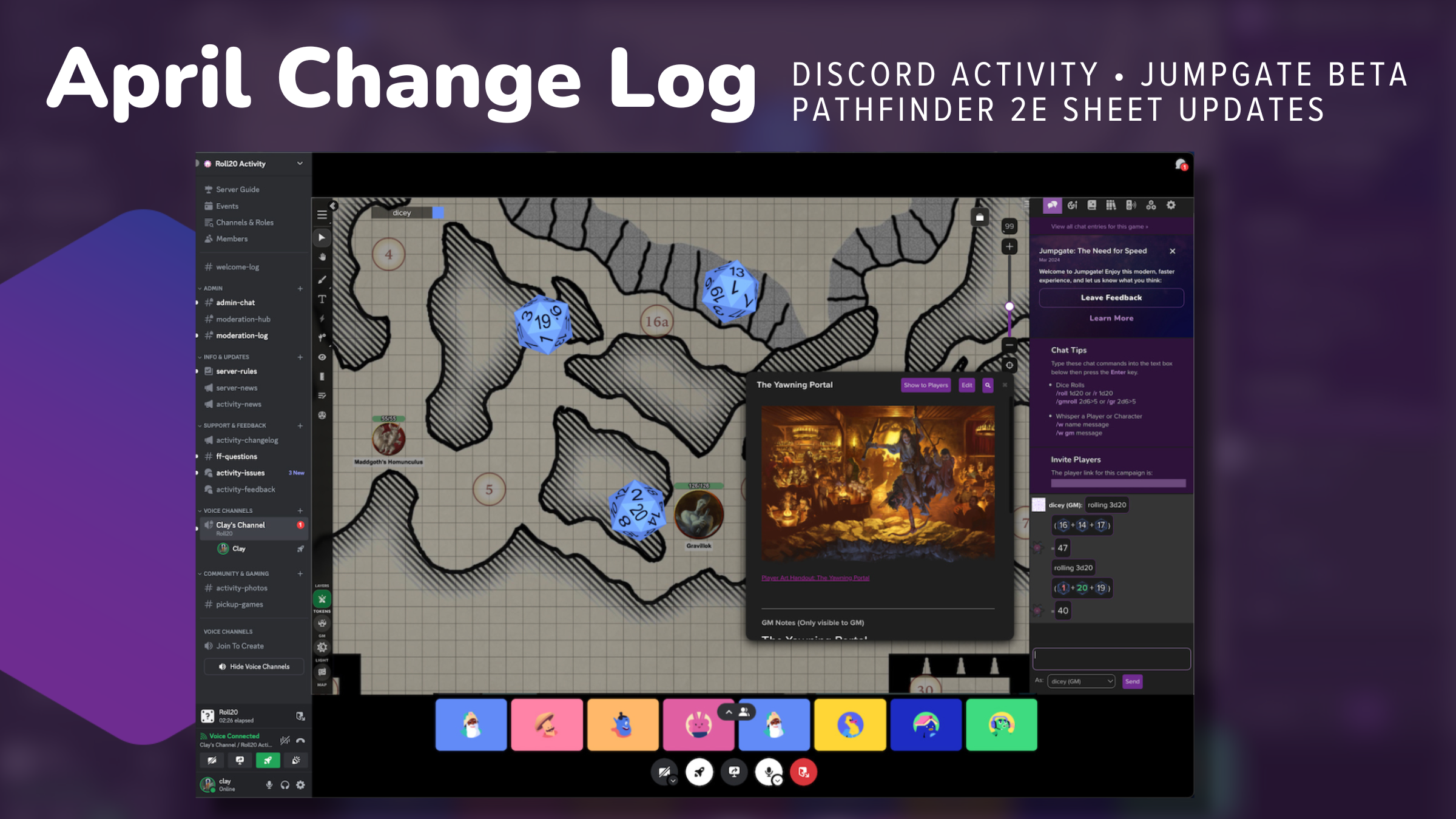

💫 Roll20 is coming as an embedded Activity within Discord to turn your channel into a full-blown online game room — Roll20 brings the tabletop and dice, and Discord handles the chat. Exclusive early access is now available for Roll20 Pro subscribers!
➕ Jumpgate Beta is open for Pro subscribers on the Virtual Tabletop. Give it a try and see all the changes we’ve made below.
📍 Our new Pathfinder 2e sheet is now able to handle the majority of core game mechanics. This means you can run a full game using our Community Preview Sheet on Roll20 Characters.
Keep reading below for more rad April updates or check out our Change Log!

VTT Improvements + Bug Fixes
Roll20 Tabletop Jumpgate Beta
Custom token marker sets including Marketplace sets should be working now. Note that if you previously applied a custom token marker to a token, you may have to add/remove at least one to get them to show up.
“Is Drawing” objects should no longer snap to the grid when resizing/rotating them.
We pushed out some performance improvements to drawings that should make them more performant in general.
Mod Scripts that rely on the selected token information to function should now be working properly.
The @{target} macros/rolls should now be working properly.
Initiative rolling (i.e. pressing the “roll initiative button” on a character sheet) should now be properly adding the token to the turn order.
We fixed a bug where radial menus and token actions were displaying for the wrong tokens. A lot of you have reported this, and apologies for how long it took us to figure out why this is happening since I know it was disruptive for your games. But hopefully this should be fixed now!
When moving an object on the Map Layer, there will no longer be a “ghost image” left behind, to match the behavior on production and also make it easier to align things to the grid.
Toggling Daylight Mode in the Fog of War UI will now correctly update it in Page Settings as well.
Auras were broken when using non-integer radius settings (e.g. “0.63”) — this should be fixed now.
We’ve improved our handling of pinch to zoom on touch devices (e.g. iPad) so you shouldn’t accidentally move objects around while zooming.
Added back in support for the “numbers” on the status markers.
We fixed a bug that was causing a condition where sometimes graphics would not load into the game and you would only see a white screen or the dynamic lighting layer. This is the same bug that folks were reporting with having the turn tracker open leading to issues with pages not loading properly.
We now remember the zoom and page location you were on when you switch pages in the same session. So when you switch back, you should be at the same spot you and zoom level you were at before!
For the GM, we now show the area that is hidden from players by showing that area of the map layer of the page as semi-transparent (similar to the effect we use for the GM Layer). This should make it easier to align the map to the edges of the page and also make it clearer to the GM what is or isn’t visible to players.
There’s now a Jumpgate Achievement Badge that you can earn by joining any Jumpgate game on Roll20. It should automatically show up in your profile if you join a Jumpgate game from today onward.
We’ve made some major improvements to load speed when loading pages that have lots of drawings on them — you should see much faster load times on these pages in Jumpgate!
Fixed a bug which could sometimes throw an error about rebuilding the initiative list.
Fixed a bug where bold/italic text could sometimes get split into multiple lines of text.
Fixed a bug where you couldn’t select a filled shape immediately after creating it.
Fixed a bug where after deleting a drawing, if the user marquee selects in the upper left-hand corner of the map/off map area, a ghost is selected.
Fixed a bug where if you were moving tokens with Preview as Player mode enabled, and you had Explorer Mode enabled, it could cause Dynamic Lighting to break.
We’ve rename the “Send to Front” option to “Bring to Front” in the context menu to be more clear about what that does.
We fixed a bug where sometimes when you loaded into a game that had custom token markers set, the token markers didn’t appear until you added/removed a token marker on the token. So custom token markers should be fully working now with the exception of the numbers on the markers.
Fixed a bug where if you did a Focus Ping (to have your players pan to a spot on the map), the Dynamic Lighting would lag behind and be weird for the players.
Players should no longer see the outline/border of the map area (that was for GMs so they could tell where the visible boundaries were).
Dashed line rendering should be working now in Jumpgate games, so you should be able to tell what barriers are transparent on the DL layer.
Fixed some drawing bugs that were showing flickering and artifacts in certain shapes.
Updated various icons throughout the interface to be correct (e.g. in the right-click menu and elsewhere)
We rolled out a change to opt everyone in our new image delivery service — this should result in faster image load times throughout the VTT.

Roll20 Characters
When choosing a sheet to create a character with, you will now see the languages that a sheet has been translated into so that you can see if the sheet is right for you.
Also, if the sheet is not already translated into your language, you can help to get the sheet translated by signing up to be a translator for that sheet.
Community Preview Pathfinder Second Edition Remaster Sheet
Enhancement to the sheet’s Spells Tab is finally here! You can now enter prepared, spontaneous, focus, and innate spell types and rituals and organize them by spell-casting method. Each type of Spell surfaces only relevant information, and allows you to automatically track Spell usage, cast Spells, and add attack and damage rolls.
In addition, you can now click on rollable text to automatically execute a roll when you have any dice references within a description of a Spell. For example, you can now roll “6d12+5 fire damage” from text description of a Spell. Please give it a try and share your feedback so we can continue to improve this.
Updated the expand/collapse design from a bar to a chevron in roll templates and across the sheet to make that functionality more discoverable based on user feedback and testing.
Added a “What’s New!” log directly to the sheet to highlight some of the largest sheet improvements and changes. You can reference or access this information through a gift icon on the top left hand side of your sheet.
Made additional Spells Tab adjustments including, adding free text form for “Cast Time” for Rituals, added “Cost” field to all Spells
The Feats section has been divided into four types: Ancestry, Class, General, and Skill Feats! Keeping your feats organized is easier than ever before. Your previously added Feats default to “General Feats” category, and you can adjust the Type in edit view to recategorize them.
Additionally, Features have been separated from Feats and given their own management window with streamlined fields.
We’ve updated the Skills tab to allow for entry and management of custom skills and lore, including ability to change linked attributes and other information. With this release, the sheet is now able to handle the majority of core game mechanics. This means you can run a full game using our Community Preview Sheet on Roll20 Characters.

Roll20 Discord Activity
Get ready for the ultimate crossover event! Roll20, the leading virtual tabletop, is teaming up with Discord to bring the full Roll20 experience to life as an embedded Activity within Discord. And Roll20 Pro subscribers get to be among the first to try it out in an exclusive beta test live now!
This means you and your gaming group can summon a full-featured virtual tabletop complete with maps, tokens, character sheets, and all the Roll20 tools you know and love – and play within the Discord interface. The best part? You can keep using Discord’s voice and video chat while rolling dice, moving tokens, and traversing your campaign world together. No more juggling between apps and windows – just one seamless role-playing experience.
Check out the Change Log for all updates!
Thank you for your continued support and feedback as we strive to make your Roll20 experience even better. Stay tuned for next month’s updates!