
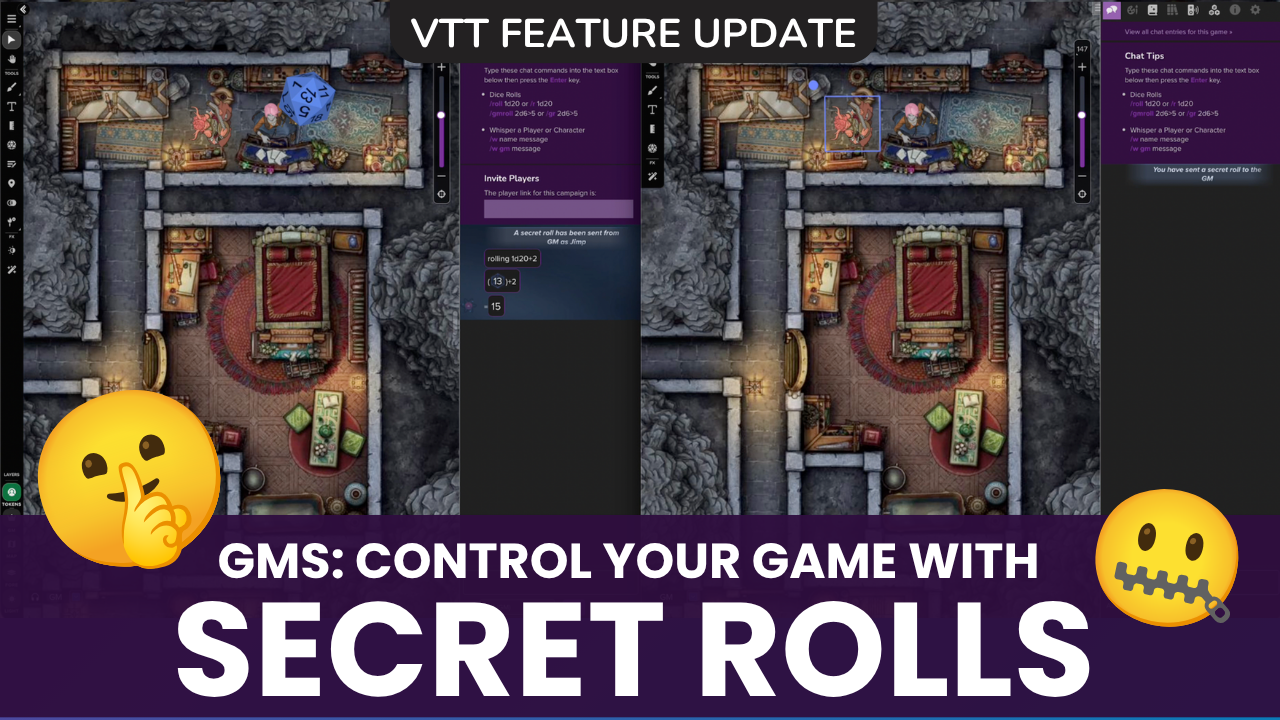

Information asymmetry is a core part of playing games like D&D. By design, Game Masters know things players don’t, and some systems like Pathfinder incorporate rules specifically to help enforce it. After all, a Perception check where the player can see the result usually leads to much different in-game decision-making than one where they don’t know whether they succeeded or failed!
Starting today, by popular demand (#4 most-requested on our Suggestions & Ideas Forum!), Secret Rolls and Super-Secret Rolls are now available on the VTT, giving GMs a way to receive dice roll results that are hidden from their players, maintaining the balance of information in-game, and providing players with an opportunity to make decisions based on gut instinct, logic, and character motivations.
Two New Rolls
Secret Rolls and Super-Secret Rolls send a roll result exclusively to the GM. Here’s how:
Secret Roll: /sr or /secretroll
Secret Rolls are perfect when the GM doesn’t want a player to know whether they succeeded or failed (or by how much) on a dice roll.
To use, players can enter /sr followed by their desired roll (example: /sr 1d20+5) into chat, or use the VTT Dice Roller by selecting “Secret” as the roll type. When rolling a Secret Roll:
- GMs receive the roll result, along with the name of the roller
- Whoever initiated the roll sees a confirmation in chat, “You have sent a secret roll to the GM”, but no roll result
- Other players see nothing in their chat

Super-Secret Roll: /ssr or /supersecretroll
What if you don’t want your player to know they’re rolling? Super-Secret Rolls are perfect for GMs setting up traps, automatic triggers like Reactions (a subscriber feature), and any other situation where players knowing a roll happened would impact the game.
To use, GMs enter the command /ssr before their desired roll in chat or the Reactions input to send a roll result to themselves without notifying the player who triggered it.

Setting a Super-Secret Roll for a Trap:
- Double-click the token that will trigger your trap (if you want it to be invisible, change the opacity to 0%)
- From the Advanced tab in Token Settings, click Send to Chat
- In the text input, type /ssr [your desired roll] (example:
/ssr 1d20) - Automatic Reset should be checked if you want the trap to activate more than once. Otherwise, uncheck this box.
Factoring in Attribute Modifiers
If you want the Reaction to incorporate a specific sheet attribute (like Characters’ Dexterity bonuses), you can. Your roll command will need to incorporate targeting and the sheet attribute. Example: /ssr 1d20 + @{selected|attribute}.
- The command “selected” should always work for identifying the character that is controlling the token that sets off the trap, regardless of what game system you are playing.
- The dice rolled (1 D20 vs. 2D12) and sheet attributes, however, will vary depending on the sheet used and the type of roll you’re making.
Here is a quick reference for some common games and their associated commands and Character Sheet attributes:
D&D Fifth Edition (5E & 5.5E and Classic)
Use command /ssr 1d20 + @{selected|attribute}
- Dexterity:
/ssr 1d20 + @{selected|dexterity_save_bonus} - Constitution:
/ssr 1d20 + @{selected|constitution_save_bonus} - Wisdom:
/ssr 1d20 + @{selected|wisdom_save_bonus}
Pathfinder 2e by Demiplane
Use command /ssr 1d20 + @{selected|attribute}
- Reflex:
/ssr 1d20 + @{selected|reflex} - Fortitude:
/ssr 1d20 + @{selected|fortitude} - Will:
/ssr 1d20 + @{selected|will}
Pathfinder 2e by Roll20
Use command /ssr 1d20 + @{selected|attribute}
- Reflex:
/ssr 1d20 + @{selected|saving_throws_reflex} - Fortitude:
/ssr 1d20 + @{selected|saving_throws_fortitude} - Will:
/ssr 1d20 + @{selected|saving_throws_will}
Daggerheart (Supported via Demiplane)
Use command /ssr 2d12 + @{selected|attribute}
- Agility:
/ssr 2d12 + @{selected|agility} - Instinct:
/ssr 2d12 + @{selected|instinct} - Knowledge:
/ssr 2d12 + @{selected|knowledge}
You can find the names of many other attributes (or those on other sheets) by opening the sheet and looking under the Attributes & Abilities tab (on newer sheets, they may be found under Advanced Tools > Attributes).
A Few Things Worth Pointing Out:
- Secret Rolls are different from GM rolls since the player who initiated them won’t see their result in chat.
- GMs will notice a subtle fog texture on the secret roll template in their chat, adding a visual cue that the result is for their eyes only.
- 3D dice are automatically disabled for players for /sr and /ssr, so you won’t have to manually toggle them on/off to avoid giving away secret dice activity. GMs will still see the dice if they have them enabled.
- Secret and Super-Secret rolls are system-agnostic, no matter what Character Sheet you’re using.
Frequently Asked Questions
Right now, Secret and Super-Secret Rolls are available to every game regardless of system, and can both be initiated in chat (+ Secret Rolls from the Dice Roller). Super Secret Rolls can be triggered as a Reaction, which can reference sheet attributes (like dexterity modifiers, for example).
If additional sheet integration, like rolling directly from a sheet, interests you, let us know which you’d most like to see.
Secret Rolls were designed primarily for players to use, so they can type /sr to send a roll result to their GM. Super-Secret rolls, on the other hand, are a great tool for GMs to initiate rolls without players knowing, like when setting up Reaction rolls for triggered traps and events.
/sr sends the result to the GM and shows the player a brief confirmation that a secret roll was sent. /ssr sends the result to the GM with no roll confirmation, and is best-suited for GM game-prep when setting up traps and other automated rolls.
Yes, GMs who have chat notifications turned on will hear a sound when receiving a Secret/Super-Secret Roll result… so if anticipating a player to trigger an invisible trap, they should either mute their mic or have an excuse ready to throw players off the scent.